"UX heuristics" sounds like one of those complicated design terms people throw around in meetings to sound smart. But honestly, the idea is very simple. Heuristics are just general usability rules that help designers check whether a product feels easy, understandable, and human-friendly.
Think of them like traffic rules for interfaces, common-sense principles for UX, or design sanity checks. They are not strict laws - more like: "if your product breaks these principles, users will probably struggle." Most people know heuristics through Jakob Nielsen's famous 10 Usability Heuristics.
You click "Place Order" on a food app. Nothing happens for 5 seconds. No loading state. No confirmation. Your brain panics: did it work? Should I tap again? Will I get charged twice? That relates to a heuristic called Visibility of System Status - the system should always tell users what's happening. Even a tiny spinner reduces anxiety.
Why Heuristics Matter
Because users don't experience products like designers do. Designers know where buttons are, how flows work, what features exist. Users don't - they come with distractions, impatience, habits, confusion, and zero context. Heuristics force you to ask: "Will this make sense to someone seeing it for the first time?"
The Most Important UX Heuristics
1. Visibility of System Status
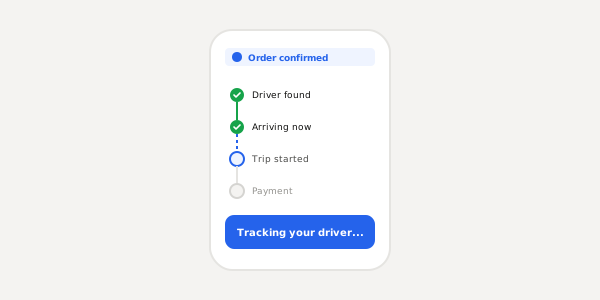
The product should always keep users informed - loading indicators, upload progress, success messages, "Payment Processing...". Apps like Uber do this well: you always know when the driver is found, arriving, the trip started, payment completed. The app keeps reducing uncertainty.
2. Match Between System and Real World
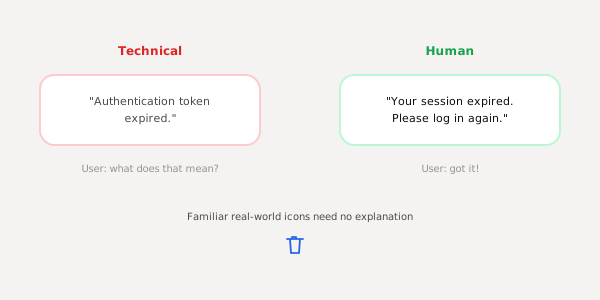
Products should speak human language, not technical jargon. "Authentication token expired" means nothing to normal users. Better: "Your session expired. Please log in again." A trash bin icon works for delete because people already understand it from real life.
3. User Control and Freedom
People make mistakes. Good UX lets them recover easily - undo, back button, cancel, edit after submission. Gmail's "Undo Send" is a perfect example. Without undo, users feel nervous; with it, they feel safe.
4. Consistency and Standards
Buttons, patterns, and interactions should behave predictably. If one button is rounded blue for "Continue" and another is a green square for the same action, that creates friction. Users learn patterns quickly - breaking them unnecessarily increases mental effort.
5. Error Prevention
The best UX prevents mistakes before they happen: disabling invalid buttons, confirming dangerous actions, showing password rules early, warning before deleting data. A good form guides users while typing instead of waiting until the end.
6. Recognition Rather Than Recall
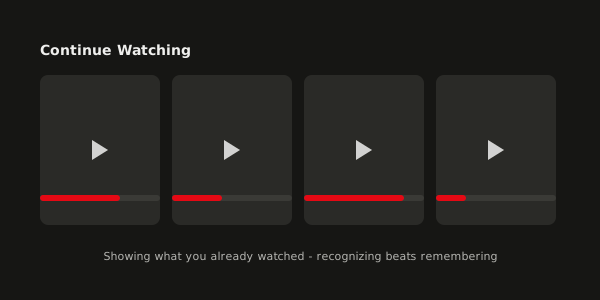
Humans are bad at remembering. Good UX reduces memory load by showing visible options - menus, suggestions, autofill, recent searches. Netflix constantly surfaces "Continue Watching" and "Recently Watched" because recognizing is easier than remembering.
7. Flexibility and Efficiency
Beginners need simplicity; advanced users need speed. Good products support both. In Figma, beginners use menus while experienced designers use keyboard shortcuts - same product, different efficiency levels.
8. Aesthetic and Minimalist Design
Minimalism is not "remove everything" - it means remove unnecessary things. Every extra element competes for attention. Users mostly want clarity; a clean UI feels mentally lighter.
9. Help Users Recognize and Recover from Errors
Error messages should actually help. "Error Code: 504" is useless. "Something went wrong while connecting. Please try again." reduces frustration. The goal is not to sound technical.
10. Help and Documentation
Ideally products should be intuitive, but sometimes users need guidance. Good help systems are searchable, simple, contextual, and not overwhelming. Nobody wants to read a 40-page manual.
Most UX heuristics are actually common sense. But while designing, teams often forget common sense because they become too close to the product. Heuristics bring designers back to reality - they remind us users are just trying to complete a task quickly without getting frustrated.